Structure
Template
Blank project
An empty workspace: a brief, folders for the project's documents, and a chat that knows the project.
- You supply: whatever the project needs
- You can edit: everything
Always-On. Always-Working.
Set it once. It keeps watching, working and flagging while you're out.
All of it, for free with Personal.
Local-first, wherever you go. No subscription needed. No cloud-dependency.
Personal is free. Join the waitlist and we'll email you when it's ready.
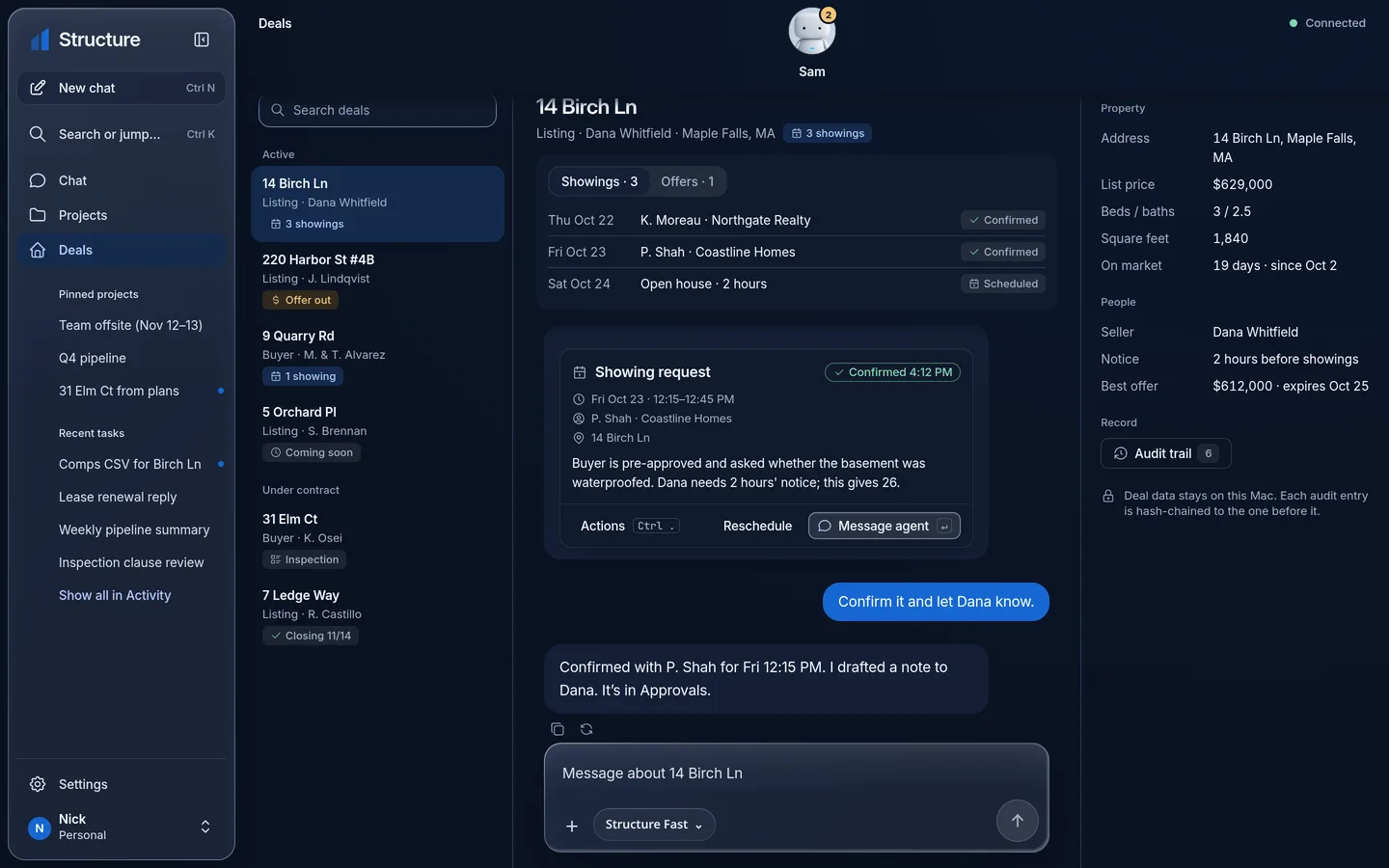
✓Showing confirmed · 14 Birch Ln · Fri 12:15 PM — just now, on your computer
For those who build, sell, and develop.
See it work
A rental you're sizing up: the asking price, rent roll and expense notes you already have — a few documents and numbers, not a new system to learn.
“Start a pro forma for this one and show me the return at three rents.” Plain words, in the project's own chat.
Starts from the Rental pro forma template, reads the documents in the project, fills the sheet with live formulas, and builds a dashboard from the same numbers.
A sheet you can inspect cell by cell, a dashboard of the same figures, and a short summary of what Sam assumed and where each number came from.
Nothing is sent anywhere. Exporting or sharing the result is a separate step, and it follows the approvals and permissions you set.
The clips on this page are recordings from the current preview with sample data. Waits are cut or sped up where noted — the work itself is shown as it happens.
How it fits together
Structure isn't a general-purpose personal agent trimmed down for real estate, and being built for one domain doesn't make it a lesser agent. It was built from the ground up for a domain of work that is always behind the curve when it comes to the latest tech — and it's built around local models, so you own the hardware, the model, and especially your data.
One computer you control runs Structure and keeps your projects, files and conversation history. Sam keeps working there after you close the app. With a local model, the thinking happens here too.
The full workspace, right on that computer — projects, sheets, dashboards and approvals, with the whole context in front of you.
Your phone reaches the same computer from anywhere: pick up the conversation, hear back when work is done, and answer an approval while you're away from your desk.
A cloud model or a connected account is a choice, not the default. Structure tells you what would be sent, and to whom, before anything goes.
Projects, files and history are stored on your computer. Your phone and other devices connect to it; they don't keep their own copies of your work.
With a local model, the work happens on your computer. If you choose a cloud model or a connected service, only what that step needs is sent — and you're told first.
Work with context
A project holds its documents, sheets and notes together, so you stop pasting the same material into every question. Start from a template, or from nothing:
Template
An empty workspace: a brief, folders for the project's documents, and a chat that knows the project.
Template
A working sheet with live formulas for rent, expenses and financing, plus a dashboard of the same numbers.
Template
Key figures and charts drawn from a project's sheets, kept current as the numbers change.
These three templates are in Structure today. More specialized templates are planned; we'll list them here when they ship.
Deal Room Coming later
Personal & Office
Personal
Free.
Optional cloud models and connected services are billed by their providers, not by Structure.
Coming soonOffice Planned, after Personal
One shared office Sam on the office computer — not a separate assistant per person:
Office pricing will be announced.
Control and data
Own the hardware. Own the model. Above all, own your data.
Your projects, files and conversation history live on the computer you control. Structure is local-first: your computer is home base; your other devices just connect to it.
With a local model, chats and files are processed on your own computer. A cloud model is optional — and the app tells you where data goes before you use one.
Actions that send or change something follow the permissions and approvals you've set — in the app, under your policy, not a blanket promise either way.
Connecting an account is per-service and per-purpose. Structure asks only for the access a feature needs, and each connection explains its data handling before you agree.
Local-first is not “nothing ever leaves”: model downloads, updates, an optional cloud model, a connected service, or the phone relay can each involve a network. The sections above say which is which, in plain terms.
Availability and setup
Provisional Final requirements will be published at launch. Every verdict below names the model and setup it assumes.
Structure Personal comes to Windows first (Windows 10 22H2 or later) and 64-bit Linux, including ARM, with Mac to follow. A computer can also just connect to one that already runs Structure — that takes far less.
Pick your specs. The answer names the local model and runtime it assumes, and says whether this computer could run Structure itself, or would be better just connecting to one that does.
Lightweight
A laptop or phone that connects to a computer already running Structure. The thinking happens on that computer, not on this one.
Gets you started
Runs Structure with a small local model (1.5–4B class). Longer requests take more time.
Day-to-day
Runs Structure with a mid-size local model (8B class) for day-to-day work.
Heavy lifting
Runs larger local models (14–30B class), remembers longer conversations, or serves more than one person.
The checker runs entirely on this page — it asks nothing and sends nothing. Figures are provisional estimates documented in our hardware notes; final requirements will name tested configurations at launch.
Your assistant

Sam doesn't wait to be asked. Between your check-ins it keeps watching what you've handed it, runs the routines you've set, and remembers how you work. The same Sam is on your phone, and it puts an approval in front of you when one is needed.
FAQ
Structure is a private, local-first AI assistant for real-estate work. It runs on a computer you control, keeps working on what you hand it after you close the app, and comes back to you with results you can inspect and decisions that need you.
Real-estate investors, developers, project managers and agents — working solo with Personal, or as a brokerage, firm or team with Office when it arrives.
Personal is one person and their own Sam on their own computer. Office is planned after Personal: one shared office Sam, separate logins, and roles — Owner, Admin, Member — that decide who can see and do what.
With a local model, your chats are processed on your own computer. Cloud models are optional, and the app tells you where data goes before anything is sent. Projects and history stay on your computer; your phone and other devices connect to it rather than keeping their own copies.
Actions that send or change something follow the permissions and approvals you set. Some work you can authorize ahead; anything outside that waits for your decision, on your computer or on your phone.
At launch, Sam can watch an email inbox (Gmail or any IMAP mailbox), message you on iMessage, WhatsApp, SMS, Telegram or Slack, and use tools that support MCP. You turn each one on, and anything that sends follows your approvals. Direct MLS and CRM connections aren't in the launch plan.
Yes. Sam runs in the background on the computer it lives on and keeps going after you close the window, including scheduled checks you've set up. If that computer sleeps or shuts down, Sam waits until it's back.
Windows first (Windows 10 22H2 or later), along with 64-bit Linux including ARM, and Mac to follow. Use the provisional hardware checker to see what a given computer could run — or whether it would be better just connecting to one that does.
Personal is free. Optional cloud models and connected services are billed by their own providers. Office pricing hasn't been announced.
Launch timing hasn't been announced. Structure Personal is coming soon; join the waitlist and we'll email you when it's ready.
Structure Personal is free — for investors, developers, project managers and agents, on a computer you control.